Manage master data
Items, product groups and supplier details are managed in a structured format. CSV imports, automated FTP file transfers and REST APIs help you import and maintain data.

Inventory & purchasing
From suggested orders to stocktakes: connect sales with purchasing and stock. This lets you track stock movements across locations.
Purchasing, stock and sales go hand in hand.
MOBILE TOOLS IN STORE
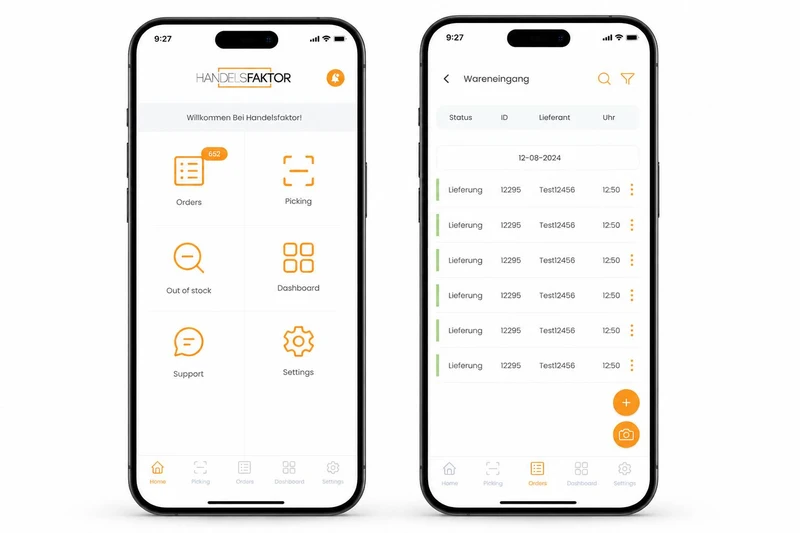
With the HANDELSFAKTOR app, mobile tasks become part of your inventory workflows. Stores and head office work with the same data.
Review sales and stock together.
Use the right supplier connection.
Check items and quantities at goods receipt.
Process stock movements centrally.
THE MOBILE DATA CAPTURE APP IN DETAIL
Record items and quantities where the goods are. The HANDELSFAKTOR handheld app supports stocktaking, goods receipt, orders and stock transfers between locations.
IN EVERYDAY USE
Selling an item affects more than revenue. It changes stock levels, reordering and availability. HANDELSFAKTOR connects these steps to purchasing and supplier processes.
Items, product groups and supplier details are managed in a structured format. CSV imports, automated FTP file transfers and REST APIs help you import and maintain data.
Sales and stock data help prepare purchase orders. Suggested orders can be reviewed against business rules and processed further.
We welcome the opportunity to connect your wholesalers and suppliers digitally. CSV/FTP or REST APIs link orders and delivery data with your goods workflows. We agree the messages exchanged for each interface.
Electronic delivery notes, quantity checks and open line items support goods receipt. Discrepancies remain visible throughout.
Sales, goods receipts and transfers form the basis of stock management. Stores and the central warehouse can be viewed together.
Handheld data capture and stocktaking functions let you count goods where they are stored. The results feed into central inventory management.
HOW IT FITS TOGETHER
Review stock, sales and outstanding orders together.
Review suggested orders and send the order through the agreed supplier channel.
Match deliveries against document data, record quantities and handle discrepancies.
Account for sales, transfers and stocktakes when tracking changes in stock.
A RETAIL EXAMPLE
A supplier delivers only part of the quantity ordered. The team needs to consider goods received, backorders and existing stock together. This is exactly what we demonstrate in an inventory management demo.
Discuss your use caseOUR PRODUCTS
Cash movements, daily closing and subsequent accounting belong together. The cashbook helps you handle these processes systematically.
RETAIL INTELLIGENCERIDE connects market intelligence, comparable product data and AI-assisted analysis. Purchasing, pricing and category management teams get options they can trace, with clear approvals and a phased introduction into your existing systems.
YOUR QUESTIONS
RELATED POS MODULES
An expected delivery is not a stock count. The following features show where staff record quantities, transfer stock between stores and reconcile it with a physical count.
WHOLESALERS & SUPPLIERS WELCOME
We welcome new wholesalers and suppliers. Whether you use CSV files via FTP or a REST API, we can connect item maintenance, ordering and goods receipt. As the POS developer, we can help shape the entire process.
THE NEXT STEP
Tell us what you need. We will show you what HANDELSFAKTOR can do for your retail business.
Request a demoAre you planning to switch systems?